Literate Voices Summer Publishing Studio
Day 6: Turning Our Stories into Graphic Memoirs
Essential Question
How can writers use images, dialogue, and comic panels to bring their stories to life?
Learning Targets
-
I can organize my story into a beginning, middle, and end.
-
I can transfer my writing into a comic strip format.
-
I can use captions, speech bubbles, thought bubbles, and sound effects.
-
I can combine words and images to tell a meaningful story.
-
Morning Focus: Family Chapter
8:30–8:45 | Mini-Lesson: Graphic Memoir Storytelling
Today we will begin transforming our written Family Chapter into a graphic memoir.
Writers will learn how graphic novelists use:
-
Panels
-
Captions
-
Speech bubbles
-
Thought bubbles
-
Sound effects
-
Illustrations
to tell stories visually.
8:45–9:15 | Story Mapping Slide
Using the Family Story Planning Slide, identify:
Title
Beginning
-
Who is in the story?
-
Where does it take place?
Middle
-
What happens?
-
What challenge, event, or important moment occurs?
End
-
How does the story end?
-
What lesson is learned?
-
9:15–10:15 | Comic Strip Drafting
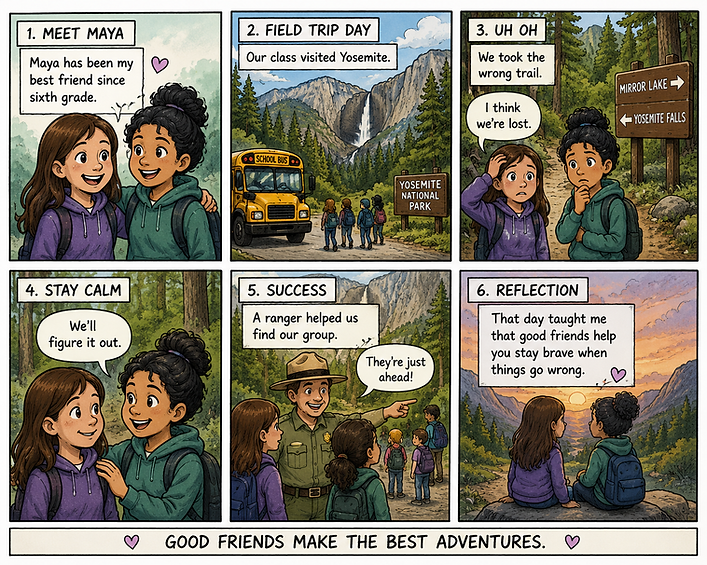
Transfer your Family Chapter onto the 6-Panel Comic Template.
Think about:
Panel 1
-
Introduce characters and setting
Panel 2
-
Build the story
Panel 3
-
Show an important event
Panel 4
-
Continue the action
Panel 5
-
Show the outcome
Panel 6
-
Reflection or lesson learned
-
10:15–10:25 | Break
10:25–11:50 | Graphic Memoir Production Studio
Continue developing your Family Chapter by adding:
✅ Illustrations
✅ Speech Bubbles
✅ Thought Bubbles
✅ Caption Boxes
✅ Sound Effects
Examples:
-
BAM!
-
CRASH!
-
WHOOSH!
-
THUD!
-
SPLASH!
Focus on showing the story through pictures and dialogue rather than simply copying your paragraph.
11:50–12:30 | Lunch
Afternoon Focus: Revising Earlier Chapters
12:30–1:15 | Name Chapter Comic Conversion
Return to your Name Chapter.
Use the same process:
-
Create a title.
-
Identify beginning, middle, and end.
-
Transfer the story to the comic strip template.
-
Add images and comic elements.
1:15–2:00 | Neighborhood Chapter Comic Conversion
Return to your Neighborhood Chapter.
Think about:
-
Important places
-
Sensory details
-
People
-
Sounds
-
Memories
Transfer your story into comic panels and illustrations.
2:00–2:25 | Publishing Studio
Continue working on:
-
Family Chapter
-
Name Chapter
-
Neighborhood Chapter
Add final details and revise for clarity.
2:25–2:30 | Reflection
Today's Success:
What comic page are you most proud of?
What is one thing you added today that helped bring your story to life?
End-of-Day Goal
By the end of today's workshop, students should have:
✅ Family Chapter transferred to comic format
✅ Name Chapter transferred to comic format
✅ Neighborhood Chapter transferred to comic format
✅ Speech bubbles, captions, and illustrations added
✅ Three chapters ready for revision and publishing